Amazon Warehousing and Distribution (AWD): How It Works in 2026

Amazon Warehousing and Distribution (AWD) sits in a strange place in the Amazon ecosystem. It’s not quite FBA, not quite a traditional 3PL, and often misunderstood as just “cheap extra storage.” In reality, AWD is a control layer—one that affects inbound costs, inventory health, and how much leverage Amazon has over your supply chain.
This guide breaks down how AWD actually works today, when it makes sense to use it, when it doesn’t, and how sellers are using it to manage inventory without bleeding margin.
What Is Amazon Warehousing & Distribution Service (AWD) and How Does It Work?
Amazon Warehousing & Distribution (AWD) is a pay-as-you-go storage and distribution service designed to hold inventory upstream from Amazon’s fulfillment centers. In practice, it gives sellers a way to store excess inventory outside of FBA while keeping it fully integrated with Amazon’s logistics network.
Here’s how Amazon AWD works:
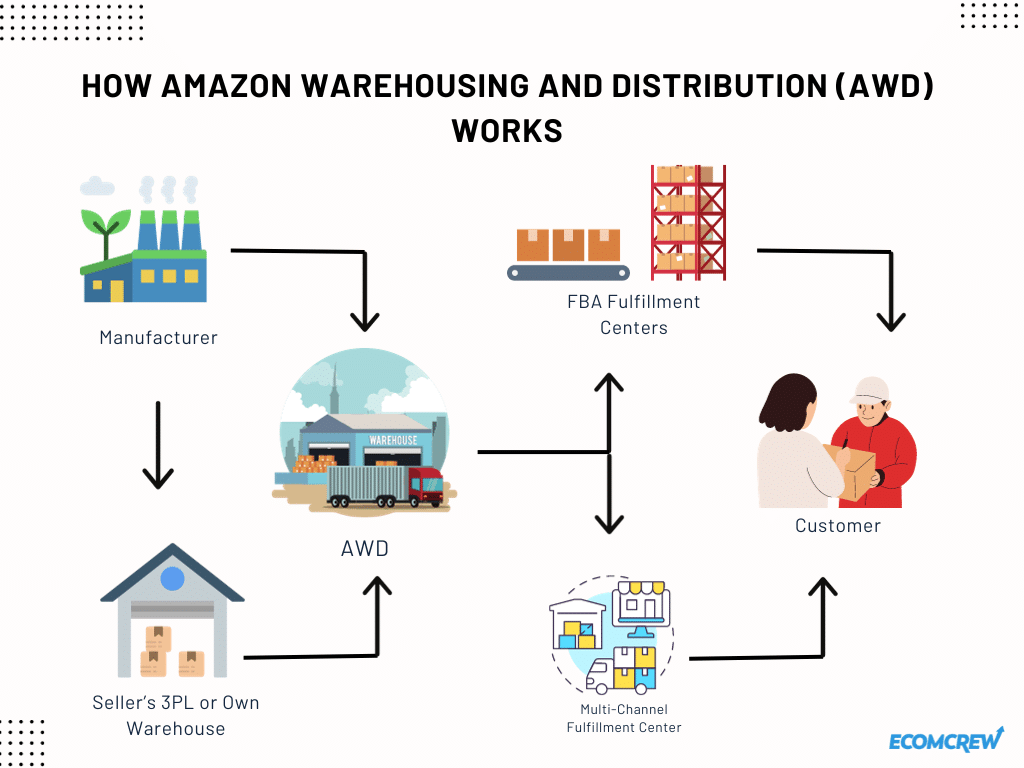
Sellers send in their inventory to AWD warehouses either from their own 3PLs or directly from their manufacturers through Amazon Global Logistics. The inventory is stored in the warehouses until they are ready for shipment to FBA fulfillment centers (for FBA sellers) and to Amazon’s multi-channel distribution services. The orders are then sent through the network until they reach customers.
AWD is especially useful to FBA sellers because the system automatically replenishes your stocks in the appropriate fulfillment center so you never run out of inventory.
Seller-Managed vs Amazon-Managed Replenishment
Auto-replenishment is one of AWD’s biggest selling points—but it’s also where sellers give up the most control.
There are two ways replenishment typically works:
Seller-Managed Replenishment
With seller-managed replenishment, you decide when inventory moves from AWD into fulfillment centers. This gives you full visibility and control over timing, which can be useful for launches, promotions, or products with volatile or unpredictable demand.
The tradeoff is that you may not qualify for certain discounted storage rates or fee waivers tied to inventory health. You get control, but you give up some of the incentives Amazon offers when it runs the show.
Amazon-Managed Replenishment
With Amazon-managed replenishment, Amazon determines when and how much inventory moves from AWD into fulfillment centers based on sales velocity and demand forecasts. In return, sellers may qualify for lower storage rates and reduced exposure to inventory-level penalties.
The downside is that Amazon’s logic prioritizes system-wide efficiency, not your specific marketing calendar, launch timing, or risk tolerance. When Amazon controls replenishment, you’re trusting its forecasts over your own.
Choosing the Right Approach
In practice, Amazon-managed replenishment works best for stable, predictable SKUs with consistent demand. For newer products, seasonal inventory, or items tied to promotions, many sellers prefer to keep replenishment decisions in their own hands.
The key is knowing which SKUs benefit from automation—and which ones still need human judgment.
How Do You Sign Up for AWD?
You can sign up to AWD by
- Going to the program page directly or
- Logging in to Seller Central, and clicking on the following: Seller Central at Growth → Explore Programs → Warehousing and Distribution → Enroll
Do take note that there are certain AWD eligibility requirements you need to meet before you can enroll.
AWD Product Eligibility
AWD supports a broader range of products than many sellers assume. Eligibility is determined at the SKU level in Seller Central, not strictly by category, so it’s important to confirm before shipping.
Products commonly eligible for AWD include:
- Standard consumer goods
- Apparel and footwear
- Beauty and personal care products (non-hazardous)
- Shelf-stable products with expiration dates
Products that generally aren’t eligible include:
- Dangerous goods and hazardous materials
- Refrigerated or frozen perishables
- Restricted SKUs blocked by Amazon
For expiration-dated products, inventory must arrive with sufficient remaining shelf life and must meet minimum thresholds to be replenished into fulfillment centers. AWD works best for fresh production runs, not short-dated or clearance inventory.
Some products need to meet FBA requirements such as barcodes and specifics for those in the restricted product categories. In addition, AWD has strict carton-level size and weight requirements. All inventory sent to AWD must meet the following conditions:
- Boxes must be conveyable
- Maximum of 25 inches on any side
- Maximum weight of 50 lb per box
These limits apply to shipping cartons, not individual ASINs. Boxes that exceed these limits may be refused at the distribution center.
What Sellers Need to Maintain AWD Access
AWD eligibility goes beyond having an active seller account. Amazon evaluates your inbound shipment performance just as closely as your overall account health.
To use AWD consistently, sellers need to be in good standing across three areas:
Account Health and Performance
Your seller account must be active and free of unresolved policy violations, performance warnings, or selling restrictions. If your account is limited or under review, AWD enrollment or shipment creation may be blocked until those issues are resolved.
Inbound Shipment Compliance
AWD relies heavily on predictable, automated receiving. As a result, Amazon closely monitors inbound shipment behavior, including:
- Incorrect box dimensions or weights
- Missing or incorrect box labels (SSCC labels)
- Preparation or labeling errors
- Shipping inventory to the wrong distribution center
- Repeated carton or pallet non-compliance
If inbound problems occur, Amazon may temporarily suspend your ability to create shipments for affected products or shipments.
These issues appear in Amazon Seller Central under the Shipment Summary and Shipping Queue pages, where you can review what went wrong and how to prevent it.
Resolving Inbound Problems
When an inbound issue is flagged, sellers typically have two options:
- Acknowledge the problem, which confirms you understand the issue and removes the suspension once acknowledged
- Dispute the problem, if you believe the issue was incorrectly identified and can provide supporting evidence
Unresolved inbound alerts can prevent you from adding affected products to new shipping plans—including AWD shipments. In practice, sellers who frequently ignore or delay resolving inbound issues may find their AWD usage quietly limited over time.
Why This Matters for AWD
AWD is less forgiving than many traditional 3PLs because it feeds directly into Amazon’s fulfillment network. Repeated inbound mistakes don’t just slow down one shipment—they reduce Amazon’s confidence in your ability to send inventory that can move through the system cleanly.
Sellers who maintain clean inbound records, accurate shipment data, and consistent packaging standards tend to have far fewer interruptions when using AWD.
Should You Use Amazon Warehousing and Distribution?
As a general rule, if you and your products are eligible for AWD, using it as a long-term storage solution is beneficial in the long run. But as with anything else, you should actually do the math. In the following sections, we’ll show real examples from our brand where we determine how much you can actually save using AWD and when you should use it.
For now, let’s examine some of the reasons why you should use AWD, especially if you’re using FBA:
Avoid inventory stock outages.
It affects both your revenue as well as brand image if customers are not able to purchase your products because of stockout. AWD eliminates this by allowing inventory replenishment automation from AWD distribution centers to FBA fulfillment centers. Buyers can still purchase your products even if the stocks are still at AWD warehouses and not yet at the fulfillment centers.
It’s often cost-competitive with many 3PLs for Amazon-focused storage..
It’s often cheaper than many third-party logistics providers for Amazon-focused storage, especially during peak seasons. However, costs can vary depending on product size, handling needs, and whether value-added services are required.
Avoid more expensive FBA fees.
FBA fulfillment centers are designed for fast-moving inventory, not long-term storage. While they enable Amazon to pick, pack, and ship orders quickly, they also carry higher storage costs—especially as inventory ages or exceeds Amazon’s preferred weeks of supply.
Monthly FBA storage fees increase during peak season, and sellers with excess inventory may also face storage utilization surcharges and aged inventory penalties. As inventory sits longer in fulfillment centers, these fees can add up quickly. AWD helps offset this by allowing sellers to stage excess inventory upstream, keeping it out of FBA until it’s actually needed.
Why AWD Can Reduce Inbound Placement Fees
One cost that often gets overlooked is the FBA inbound placement fee.
When you send inventory directly to FBA, Amazon often requires you to split shipments across multiple fulfillment centers. If you choose not to—or if Amazon determines your shipment isn’t optimally distributed—you pay a placement fee per unit for the convenience of sending inventory to fewer locations.
AWD changes that equation.
When inventory is sent to AWD first, Amazon handles downstream placement internally. Inventory is redistributed from AWD to fulfillment centers based on demand, without triggering inbound placement fees on your end. In effect, AWD becomes Amazon’s staging layer, allowing them to optimize fulfillment center placement without charging you for it.
For sellers with large inbound shipments or frequent restocks, avoiding placement fees alone can offset a meaningful portion of AWD storage and transportation costs. In many cases, this is the reason AWD makes sense—even before factoring in long-term storage savings.
Pros and Cons of Using Amazon Warehousing and Distribution
| Pros of Using AWD | Cons of Using AWD |
|---|---|
|
|
How Much Does It Cost to Use Amazon AWD?
Enrolling in AWD is free, but the service operates on a pay-as-you-go pricing model. Sellers typically pay for the following:
| AWD Fee | Description | Base Rate | Smart Storage Rate | Amazon Managed Rate |
|---|---|---|---|---|
| AWD Storage | West Region (Including the West Palletizable Region) | $0.57/cubic foot per month | $0.51/cubic foot per month (10% off base rate) | $0.46/cubic foot per month (20% off base rate) |
| Other Regions | $0.48/cubic foot per month | $0.43/cubic foot per month | $0.38/cubic foot per month (20% off base rate) | |
| AWD inbound processing fee | $1.40/box | $1.40/box | $1.40/box | |
| AWD outbound processing fee | $1.40/box | $1.40/box | $1.40/box | |
| AWD transportation fee | $1.40/cubic foot | $1.40/cubic foot | $1.26/cubic foot (10% off base rate) | |
Storage rates vary by region, with higher-demand locations generally costing more. Sellers who allow Amazon to manage replenishment may qualify for discounted storage rates and certain fee waivers tied to inventory health.
AWD storage is typically less expensive than keeping excess inventory in fulfillment centers, particularly during peak periods.
Is it cheaper to use AWD?
In most cases, yes—especially for inventory that would otherwise sit in fulfillment centers for extended periods.
Fulfillment centers are designed for fast turnover, not long-term storage. Inventory held too long in FBA can incur peak-season storage rates, aged inventory surcharges, inbound placement fees, and inventory-level penalties.
Inventory stored in AWD does not accrue FBA aged inventory surcharges and can be replenished into fulfillment centers as needed. For seasonal products or buffer stock, this difference alone can have a meaningful impact on margins.
How Does AWD Compare With Other 3PLs?
As you can see, the difference between AWD and FBA storage is substantial enough to affect long-term inventory costs. Fulfillment centers are designed for speed, not for holding excess inventory. For most sellers, keeping only what’s needed in FBA and staging the rest elsewhere is still the right approach.
So how does Amazon Warehousing & Distribution compare with common third-party logistics providers?
AWD vs Common 3PL Options (Side-by-Side Comparison)
| Factor | Amazon Warehousing & Distribution (AWD) | ShipBob | ShipMonk | ShipHero |
|---|---|---|---|---|
| Primary role | Upstream buffer for Amazon inventory | Multi-channel fulfillment | DTC & subscription fulfillment | High-SKU fulfillment operations |
| Storage pricing model | Cubic-foot based, region-dependent | Pallet, shelf, or bin based | Bin-based by size tier | Daily SKU-based cubic volume |
| Seasonal pricing impact | No peak storage spikes | Q4 surcharges common | Minimums apply year-round | Less seasonal, but volume-sensitive |
| Monthly minimums | None | Common | Common | Common |
| Pick & pack fees | Not applicable for FBA replenishment | Per-pick after base threshold | Per-order / per-item | Included in fulfillment fee |
| Returns handling | Limited, Amazon-controlled | Available, fee-based | Available, often fee-heavy | Available with layered fees |
| Prep & labeling services | Not offered | Offered (paid) | Offered (paid) | Offered (paid) |
| Amazon integration | Native and automated | Supported, indirect | Supported, mostly manual | Supported |
| Non-Amazon fulfillment | Available via Amazon distribution | Core strength | Core strength | Core strength |
| Flexibility & customization | Low | Moderate | High | High |
| Best fit for | Amazon-centric buffer inventory | Brands selling across channels | DTC brands, subscriptions | Large catalogs with steady volume |
AWD tends to make the most sense when inventory is primarily destined for Amazon and doesn’t need frequent handling. Its biggest advantage is keeping excess stock out of fulfillment centers and avoiding FBA penalties tied to long-term storage, inventory age, and placement.
Traditional 3PLs tend to make more sense when inventory requires customization—such as kitting, bundling, prep services, or hands-on returns management—or when fulfillment is evenly split across multiple non-Amazon channels.
How Do You Decide How Much Inventory to Send to AWD?
FBA should hold what you need for near-term sales. Anything beyond that starts working against you through storage costs, utilization surcharges, and aging penalties. AWD gives you a place to stage that excess inventory while staying inside Amazon’s network.
How We Approach It
Rather than using a fixed formula, we look at inventory in three buckets:
- What needs to be in FBA to support current demand
- What belongs in AWD as buffer stock
- What stays in transit until it’s actually needed
Stable SKUs with predictable demand tend to work well in AWD. Products tied to launches, promotions, or frequent changes usually require tighter control.
How We Model the Decision
For our brands, we track how long inventory can sit in AWD before costs outweigh the benefit of keeping it out of FBA. That calculation factors in sell-through, AWD storage and transfer costs, and FBA storage and surcharge exposure.
We automate this using Amazon data so decisions are based on actual velocity, not guesswork. We cover this process—and the tools we use to model it—in more detail inside EcomCrew Premium.
Final Thoughts
AWD seems like a win-win for both Amazon and its selling partners (not so much for other 3PLs). However, this is another way of making sellers more dependent on Amazon’s ecosystem, a la Apple.
This level of vertical integration also increases Amazon’s influence over seller logistics decisions, an area that continues to attract attention from regulators and policymakers.






Do you if the AWD implement the FIFO for the product stored at the AWD?
Great article. I am looking to ship one of my new products in AWD. Is palletization required for LTL? I have read mixed opinions.
No it’s not.
Interesting read. Obviously AWD is the way to go and rates have lowered this year. That is great for the manufacturers. Very well put together article. I really enjoyed looking at the graphs and the differences over time.
Glad you found it helpful, Ashley!
Great article EcomCrew team. Do you know if I can use the Amazon Warehousing & Distribution (AWD) program to send in *new* ASINs?
Or does it have to be an existing ASIN that I have already sold on Amazon, which will then be replenished when I’m about to go out of stock of that existing ASIN?
Scenario: I’m a private label seller who uses FBA. I regularly ship my products from China to USA using Amazon Global Logistics, and recently I started occasionally using AWD when I can’t ship directly into an FC due to Amazon’s restock limits. My supplier just finished producing an order of a *new* product I haven’t sold on Amazon before. Due to Amazon’s restock limits, I can’t create an FBA inbound shipment directly to an FC. If this were an existing ASIN that I have already been selling on Amazon, I would not hesitate to create an AWD shipment. But because this is a new ASIN, I’m unsure what will happen if I ship it to the US using AWD. It looks like I’m able to create an AWD shipment for this new ASIN, but I’m unsure what will happen when it gets to the Amazon AWD warehouse. Will it just sit there forever, and never be automatically be sent into an FC, because there is no going-out-of-stock trigger to do so given that it’s a new ASIN?
Thank you!
I believe it can be a new ASIN.