How to Sell on TikTok Shop in 2026: A Step-by-Step Guide

TikTok Shop has gotten big enough that sellers can stop treating it like an experiment. Momentum Works and Tabcut estimate that the platform generated $11.8 billion in U.S. gross merchandise value during the first half of 2026, up 103% year over year. Their H1 2026 research puts global GMV at $50.3 billion.
The opportunity is there. Turning it into a useful sales channel takes more than uploading your catalog and waiting for someone to discover your particularly photogenic kitchen utensil.
To sell on TikTok Shop, you need to register and verify a seller account, finish your payment and shipping setup, and submit your products for approval. From there, you can connect a TikTok account, publish shoppable content, and bring creators or paid advertising into the mix.
This guide walks through that process for U.S. sellers selling their own products, with practical starting points for merchants coming from Amazon, Shopify, or a first online business.
Step 1: Create and Verify Your TikTok Shop Seller Account
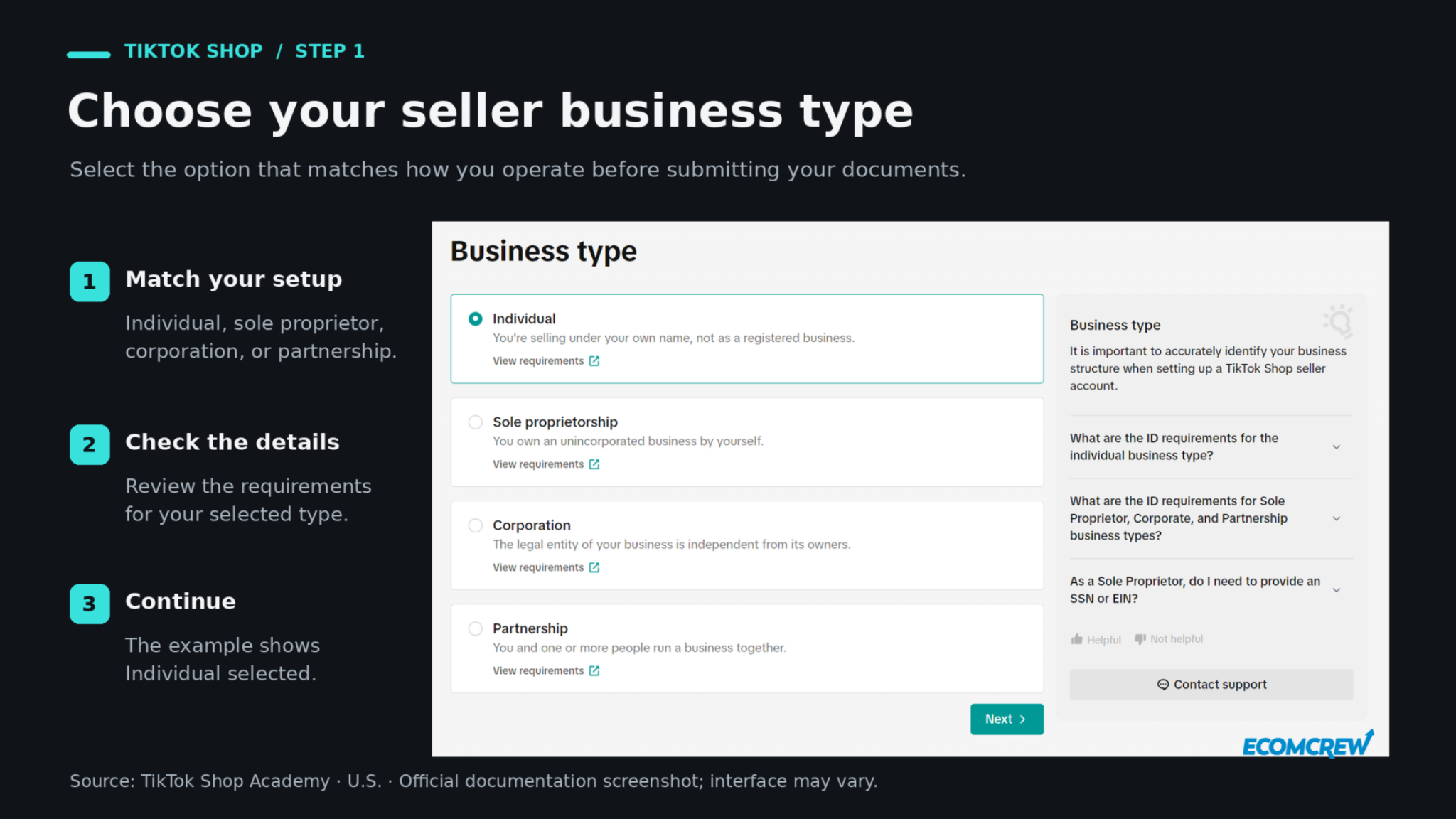
Start at TikTok Shop Seller Center and select the business type that matches your operation. Get this right before uploading documents: the information TikTok asks for depends on whether you register as an individual, sole proprietorship, corporation, or partnership.
Check Your Seller Eligibility
Under TikTok's U.S. individual seller requirements, applicants must be at least 18, live in the United States, and provide accepted identification. That includes a U.S. passport or passport card, driver's license, state ID, or Permanent Resident Card. You'll also need personal, taxpayer, and banking information for verification and payments.
Business registration requires the relevant entity and owner details. For example, TikTok's sole proprietorship registration instructions distinguish applicants with an EIN from those registering through the individual route.
Submit Documents That Match Your Application
Gather your ID, address information, and any requested business or tax documents before you start. Use your legal details consistently rather than switching between a business name, nickname, and whatever appears on an old bank statement.
TikTok requires clear, valid documents that match your registration information. Upload the complete document and follow the file requirements shown during onboarding. If verification fails, check the rejection reason and correct the relevant field or document before resubmitting.
Step 2: Add Your Tax, Bank, and Warehouse Information
Once you've worked through verification, give the shop somewhere to send your payouts and somewhere to route orders and returns. These settings are easy to rush because they don't feel like selling. They're also the settings you'll wish you had checked when an order needs to ship.
Complete Your Tax and Payout Setup
Open My Account → Account Settings → Taxes and complete the required Form W-9 information. Make sure it agrees with the information submitted during onboarding, then electronically certify it.
Next, open My Account → Account Settings → Bank Accounts, or access payout settings through Finances → Overview. Only the shop owner can add or update the payout account. The beneficiary name must match the onboarding information, and corporate sellers must use a company bank account.
Set Your Shipping and Return Addresses
Go to Logistics → Warehouses to add your pickup and return locations, including the contact name, phone number, and address. Set the appropriate default pickup warehouse for your products.
If a fulfillment partner handles your inventory, confirm the shipping and return arrangements with them first. A registered business address and a warehouse that can actually receive returned merchandise may be different places.
Before moving on, check who will monitor incoming orders and customer messages. Even a small test needs someone responsible for the daily work.
Step 3: Add Your First Products to TikTok Shop
For a first launch, we'd start with a small selection you can explain clearly, keep in stock, and ship reliably. That gives you room to learn which product demonstrations and offers work before spreading your attention across the entire catalog.
Check the costs in Step 9 before committing to a price. Your best-selling Amazon product may need different economics once creator commissions and TikTok fulfillment enter the picture.
Create a Product Listing
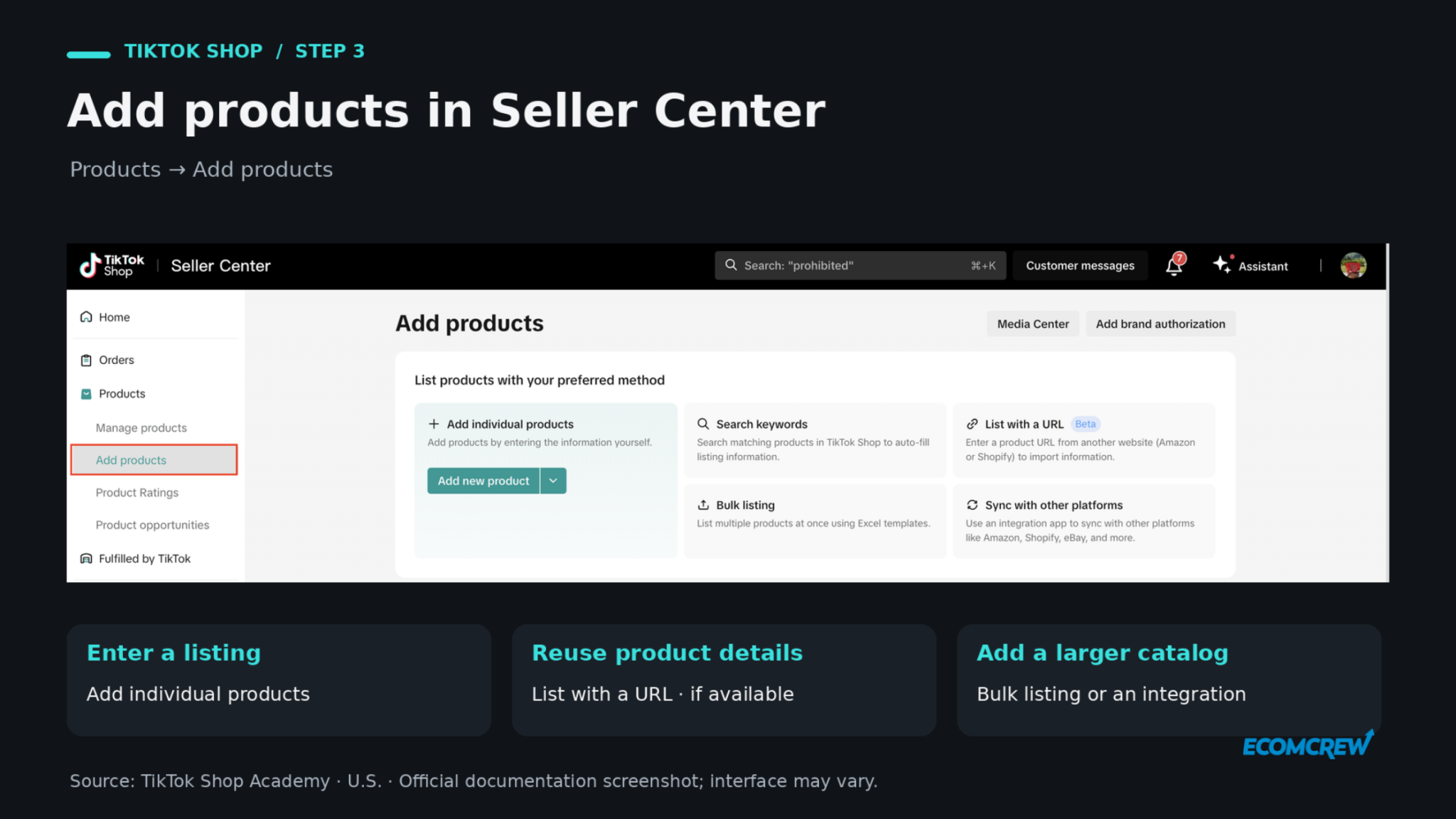
In Seller Center, open Products → Add Products and choose the individual listing option. TikTok's product listing workflow covers the category, title, images, description, variants, pricing, inventory, and shipping details. Complete any required brand authorization or product certifications, preview the listing, and submit it for review.
Write for someone seeing the product for the first time. A listing for a drawer organizer should make its measurements, materials, pack quantity, and fit easy to understand. Show the organizer in a drawer, include a dimensions image, and explain what arrives in the box.
Those details also give you material for videos later. “Will this fit my drawer?” is both a buying objection and a perfectly useful demonstration idea.
Import Amazon or Shopify Listings If Available
If you already sell elsewhere, importing an Amazon or Shopify listing can reduce the manual setup. TikTok's List with a URL feature is currently a beta available to selected sellers.
On desktop, find Products → Product Listing → List with a URL, select List Now, and paste your product URL. Import the details, open the draft, complete missing information, and submit it for review using the URL import workflow.
Review the imported copy, images, variants, and package measurements carefully. Also treat this as a listing import: don't assume it will keep stock and prices synchronized. If you need ongoing synchronization, evaluate a supported integration.
Step 4: Link Your TikTok Account to Your Shop
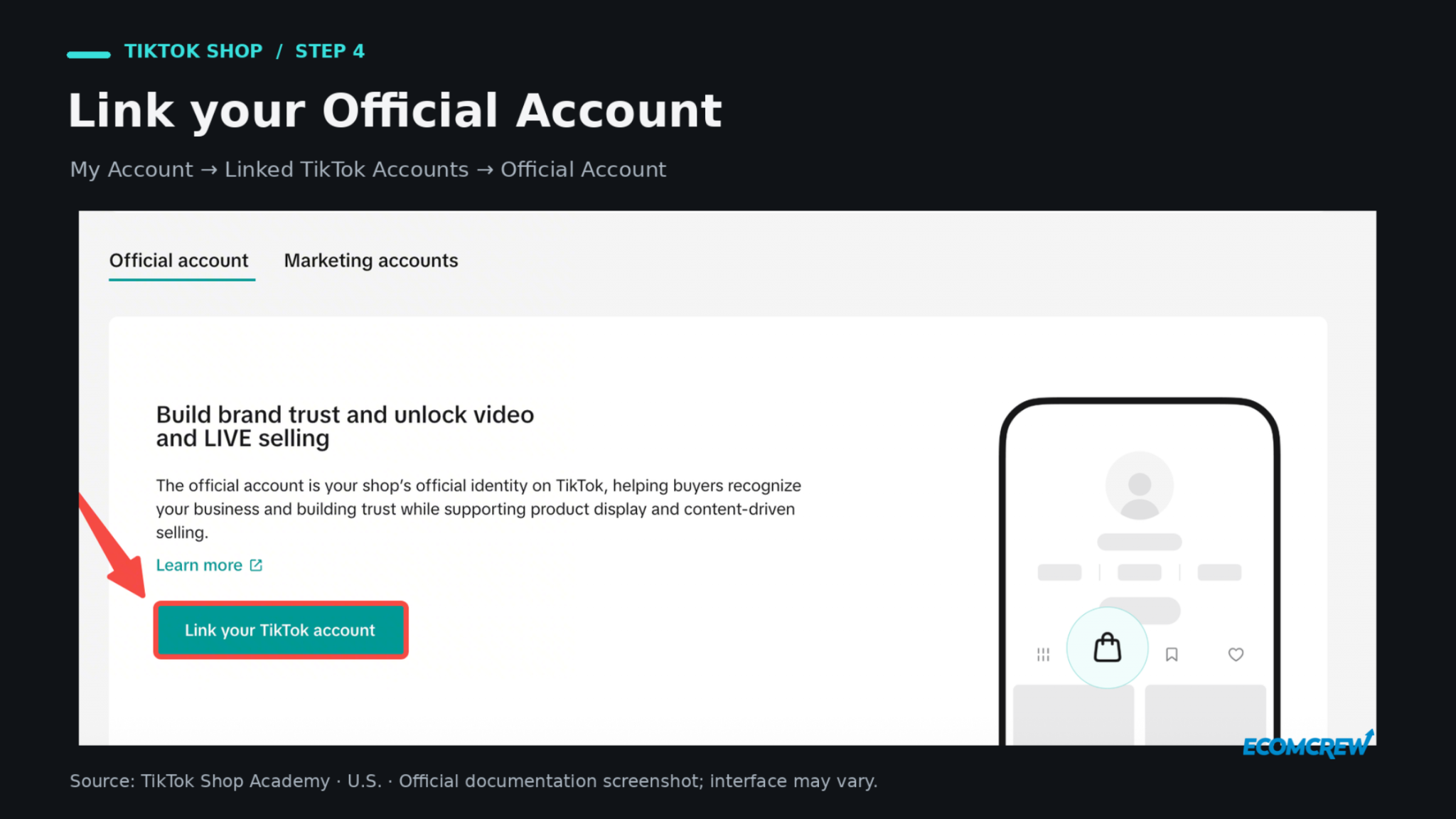
Your Seller Center account handles the business; the linked TikTok account gives customers a profile and content to interact with. Linking an Official Account adds a Shop Page to the profile and enables your account to publish product-linked content, as described in TikTok's account-linking instructions.
Connect Your Official Account
Open My Account → Linked TikTok Accounts → Official Account as the shop owner. Choose the relevant option to connect an existing account or create a new one, then follow the authorization prompts.
A shop can link one Official Account and up to four Marketing Accounts. The Official Account automatically displays the shop catalog; Marketing Accounts use showcases for selected products. For a first launch, focus on getting the main account connected and confirming that shoppers can find your products.
Check Whether You Need an Organization Account
Since July 1, 2026, corporations, partnerships, and sole proprietorships linking a new Official Account, or relinking one after removal, must use an Organization Account. Existing personal Official Accounts can remain connected until unlinked, and individual sellers are unaffected by this requirement.
TikTok's Organization Account rules also state that upgrading a personal account is permanent. Review the ownership and feature changes before converting an account you use for other purposes.
Step 5: Choose How to Fulfill TikTok Shop Orders
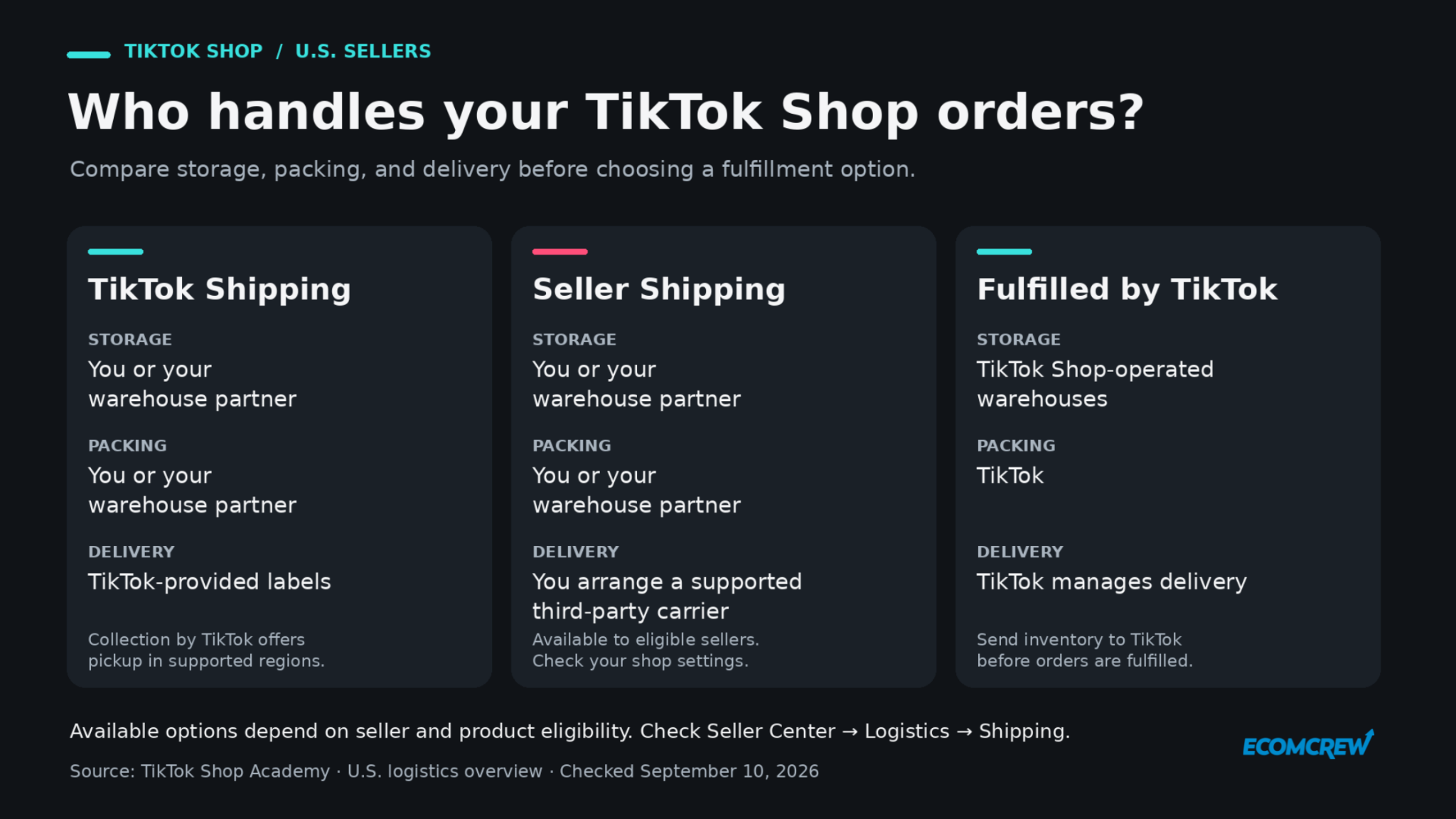
Before publishing your first promotion, open Logistics → Shipping and check which options your shop can use. TikTok's U.S. logistics options depend on seller and product eligibility.
| Fulfillment option | Inventory and packing | Shipping arrangement |
|---|---|---|
| TikTok Shipping | You or your warehouse partner store and pack the products. | Use TikTok-provided shipping labels. Collection by TikTok adds pickup in supported regions. |
| Seller Shipping | You or your warehouse partner store and pack the products. | Eligible sellers arrange delivery through supported third-party carriers. |
| Fulfilled by TikTok (FBT) | Send inventory into TikTok Shop-operated warehouses. | TikTok handles storage, packing, and delivery. |
For a small launch, compare the available options against your existing operation. If your warehouse already ships daily, examine the work needed to process TikTok orders there. If packing individual orders would become a bottleneck, compare FBT's charges and inventory requirements.
Confirm the Cost and Handling Process
Measure and weigh the packed parcel, including packaging. TikTok Shipping charges use the greater of actual and dimensional weight, so the product's weight alone doesn't tell you what the shipment will cost.
Then walk through who will pick the order, print the label, hand over the parcel, and handle a return. Confirm the applicable dispatch deadlines and tracking requirements shown in Seller Center before accepting orders.
If you use FBT, make sure the inventory is received and available before driving traffic to it. Wherever the stock sits, the quantity available for sale should reflect what you can fulfill.
Step 6: Start Selling Through Product Listings, Videos, and LIVE
A finished shop needs a route to customers. TikTok offers shopping surfaces where people browse products directly, plus videos and livestreams where the demonstration can introduce the purchase.
The distinction matters. Momentum Works estimates that Shop accounted for 51.4% of attributed U.S. TikTok Shop GMV in H1 2026. That attribution doesn't mean content played no role earlier in the buyer's journey. It does give sellers another reason to make the listing useful after the video earns the click.
Publish Your First Shoppable Video
Start with one question the product can answer visually. For the drawer organizer, show the cluttered drawer, fit the organizer, and demonstrate what it holds. Explain the measurements as you go, then direct viewers to the linked product.
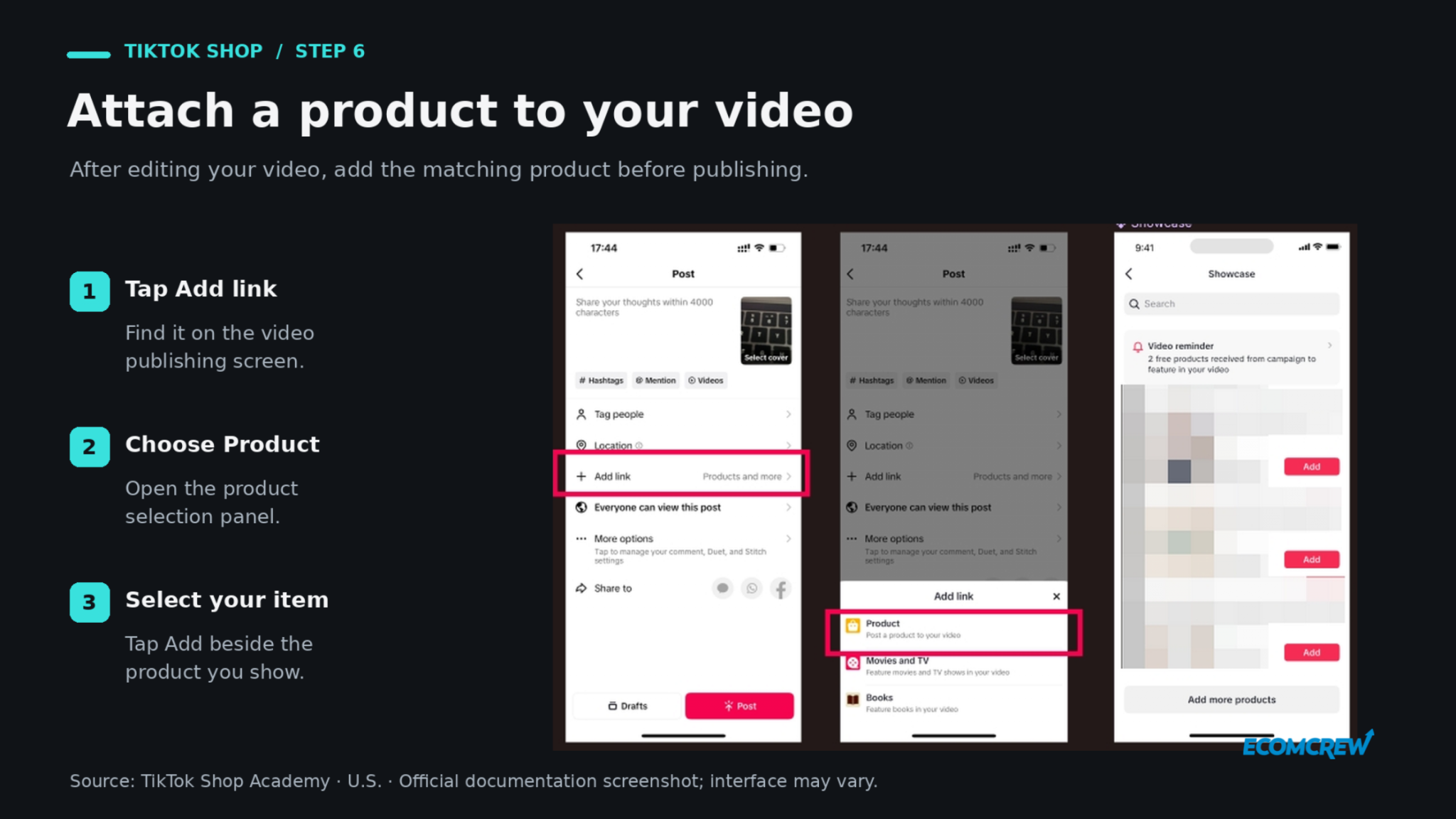
To attach a product to a video, record or upload your clip in TikTok, finish editing, and choose Add link → Product. Select the matching item, check the displayed product name, and publish. Use the required commercial content disclosure when promoting your business or a product.
For your first batch, try a demonstration, an answer to a common question, and a comparison between relevant uses or sizes. These are starting ideas to test. Look at product clicks and orders alongside views so you can see whether the content helps people buy.
Use LIVE When Interaction Adds Value
Once the account has the required LIVE shopping access, consider a session if shoppers would benefit from asking questions while you demonstrate. Prepare the featured products, confirm stock and pricing, and outline what you'll show before starting.
A useful first session could explain how several organizer sizes fit different drawers and answer measurement questions. Give yourself a repeatable format before committing to a packed livestream schedule. LIVE is an additional selling option, so you can build it into the operation when you have the products and time to support it.
Step 7: Work With TikTok Shop Affiliate Creators
Creators can give the same product different demonstrations and audiences. Approach the first collaborations as a way to find out who can explain the product convincingly and generate sales at a cost your margin supports.
Choose Open or Target Collaboration
In Affiliate Center, review the collaboration options. Open Collaboration makes products available to eligible creators, with an optional approval requirement. Target Collaboration lets you invite specific creators for selected products.
For Open Collaboration, check which products are already included, review any auto-add settings, and set the commission and sample options. For targeted outreach, use Collaboration → Target Collaboration, select the creators and products, and complete the invitation terms.
Review standard and Shop Ads commissions separately. TikTok supports standard commission settings from 1% to 80%, and the Target Collaboration standard rate overrides the Open Collaboration standard rate for the same creator and product. A rate the platform allows still needs to work for your business.
Evaluate the Fit Before Sending Samples
Watch several recent videos before choosing a creator. For our organizer example, look for someone who can demonstrate home storage clearly and answer practical questions. Review relevant sales information where available, plus the quality of their explanations and audience interactions.
TikTok's Promotion Performance Score evaluates qualifying affiliate creators on product selection and content quality using a daily score from 0 to 5. It adds context, but your own product fit and results still matter.
Track samples sent, content published, attributed orders, and the resulting contribution margin. Include samples that never produced a useful post in the cost of your creator program. Otherwise, your spreadsheet quietly develops an impressive imagination.
Step 8: Test Product GMV Max Advertising
We'd introduce paid promotion once you understand the product's costs and have useful creative to test. That's a suggested launch sequence, not an eligibility requirement: TikTok says Product GMV Max can promote products regardless of their initial sales or creative volume.
The system automates ad delivery using eligible assets, including authorized affiliate videos. A demonstration that already earns product clicks gives you a concrete starting point for evaluating what paid distribution adds.
Create a Focused Campaign
To create a Product GMV Max campaign, open Shop Ads → Create GMV Max ads → Promote products in Seller Center. Select your products, choose an ROI target and daily budget, set the schedule, review the settings, and publish when ready. Check the instructions for overlapping campaigns if those products are already advertised.
Start with products whose costs and stock you can monitor closely. Decide how much you can spend on the test and what result would justify continuing before the campaign starts.
Read Campaign ROI Alongside Your Costs
GMV Max reporting attributes orders for the advertised products to the campaign, including organic and affiliate orders. Its reported sales therefore should not be treated as proof that paid ads caused every purchase.
Some advertisers also have Affiliate Cost Optimization, which uses GMV divided by combined ad and affiliate costs. If available, the setup includes GMV Max Pro → Ad + Affiliate ROI.
That adds a useful cost to the calculation, but product cost, shipping, returns, and other expenses still need their own accounting. Compare campaign reporting with total shop sales, spend, and contribution margin before increasing the budget.
Step 9: Check TikTok Shop Fees and Your Actual Margin
Build this calculation before setting your launch price, then replace your estimates with actual order costs as sales arrive. Gross merchandise value tells you how much merchandise sold. It doesn't tell you what the sale left behind.
Find the Referral Fee for Your Category
TikTok's published U.S. category referral fee schedule lists 6% for most categories, with exceptions including selected jewelry and pre-owned categories. Check your exact category and any applicable promotional terms rather than assuming every sale has the same rate.
Calculate Contribution Margin Per Order
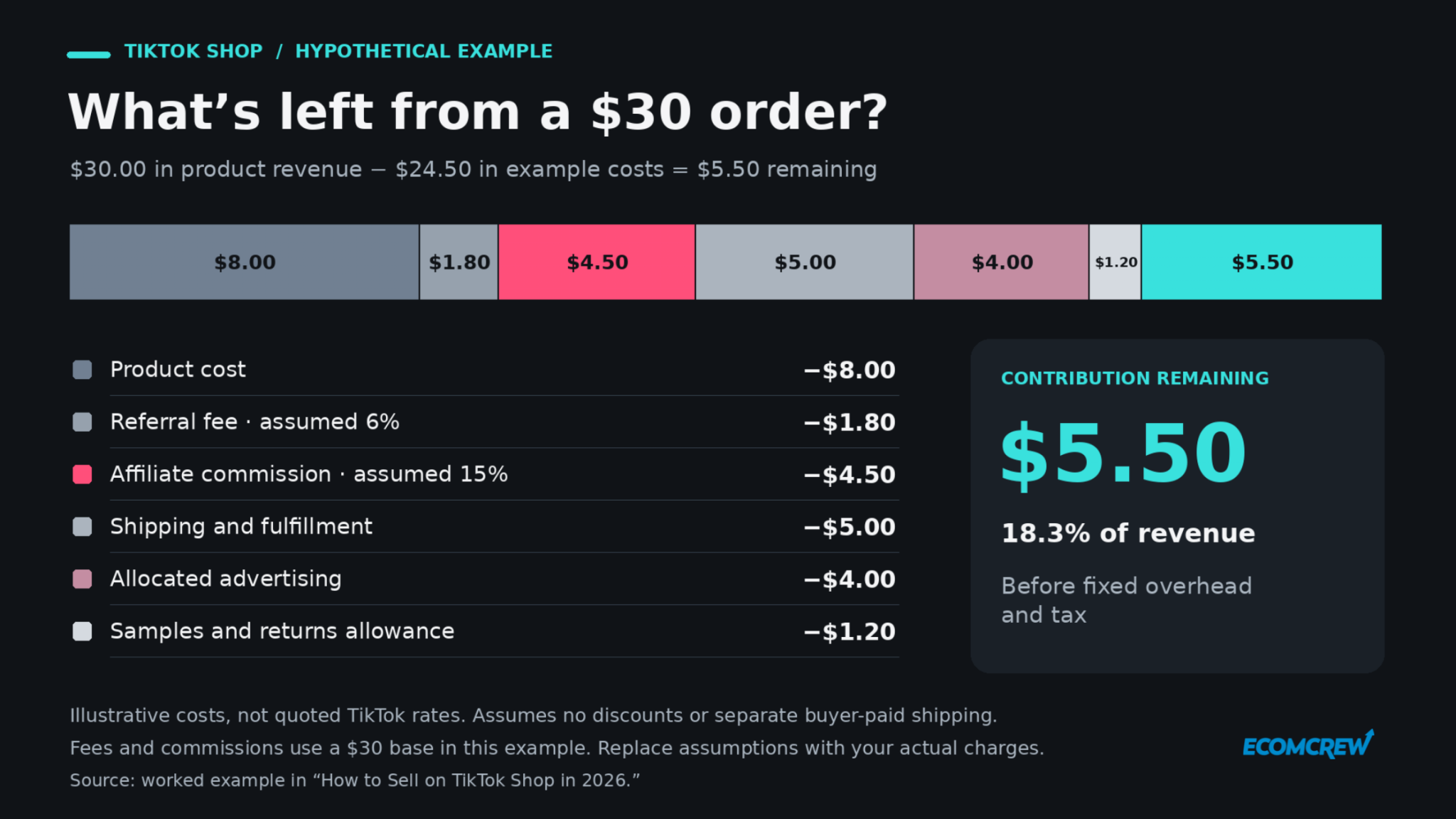
Here's a simplified hypothetical example, using a $30 sale and assumed costs. It is not a quote for TikTok fulfillment or a promise of advertising performance. It assumes no discounts or separate buyer-paid shipping, and uses $30 as the fee and commission base for illustration.
| Item | Amount |
|---|---|
| Product revenue | $30.00 |
| Product cost | −$8.00 |
| Referral fee, assuming 6% | −$1.80 |
| Affiliate commission, assuming 15% | −$4.50 |
| Shipping and fulfillment | −$5.00 |
| Allocated advertising cost | −$4.00 |
| Allowance for samples and returns | −$1.20 |
| Contribution remaining before fixed overhead and tax | $5.50 |
That leaves an illustrative contribution margin of about 18.3%. If the affiliate commission rose to 25% with everything else unchanged, another $3 would leave the order, reducing the contribution to $2.50.
In your own calculation, use the actual settlement charges, account for seller-funded discounts once, and allocate shared costs such as samples consistently. Review the results by product and creator. A high-volume SKU can deserve less promotion if a smaller one produces healthier margins and fewer operational problems.
For the first launch, aim for a manageable catalog, a reliable fulfillment process, and a few useful demonstrations. Use the first orders to improve the listing and understand the costs, then expand the products, creators, and campaigns that justify more investment.
Happy selling.