Black Friday Checklist: 10 Costly Mistakes to Fix This Week

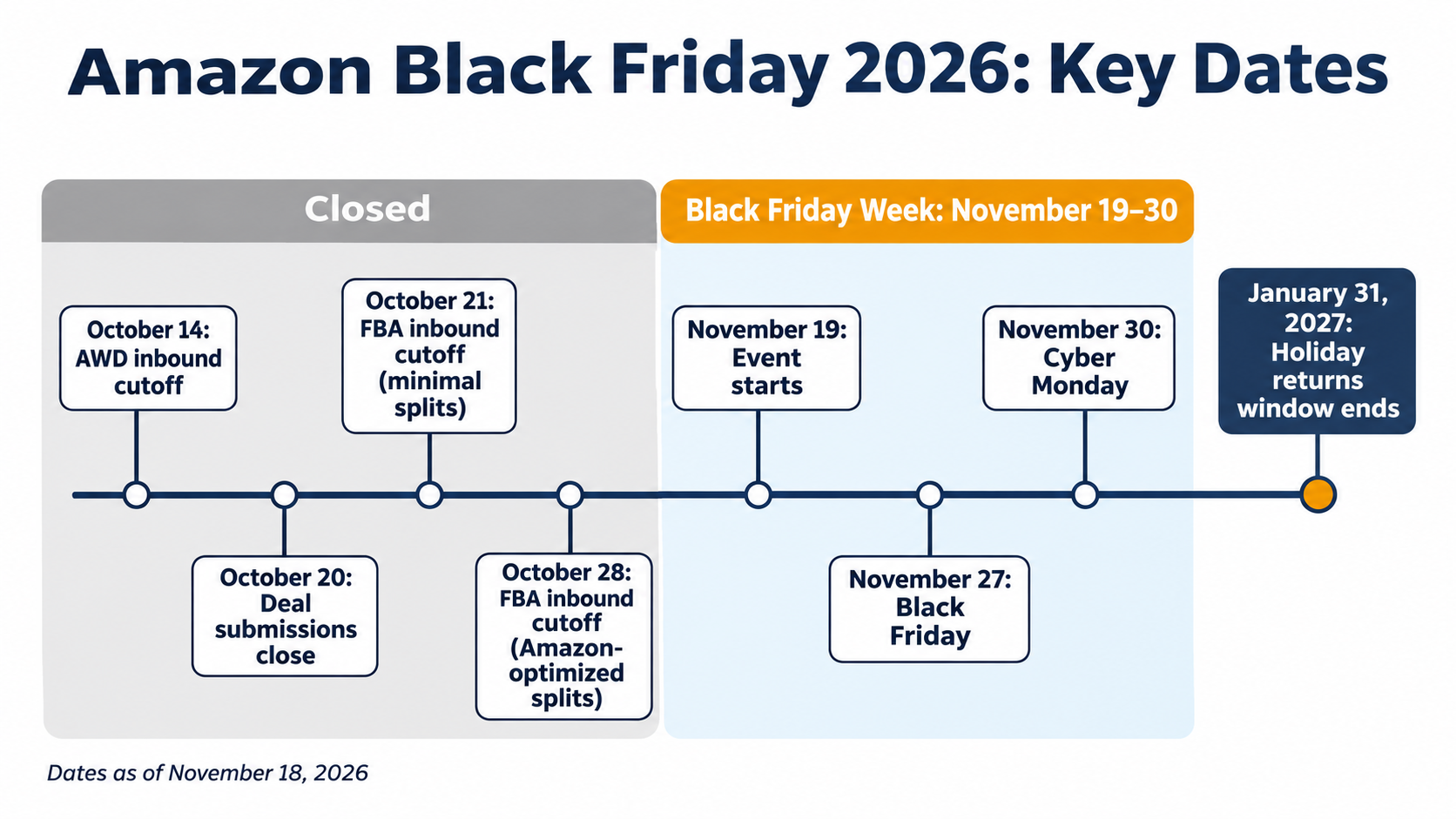
Black Friday is November 27, 2026, but on Amazon it starts a week earlier. Black Friday Week runs November 19–30, and the Fulfillment by Amazon (FBA) inbound and deal deadlines passed in October. You can't add FBA stock or new Lightning Deals now, but you can still fix what decides whether this week makes money.
There's a lot riding on it. Adobe forecasts $47.5 billion in US online sales over Cyber Week, the 5 days from Thanksgiving to Cyber Monday, up 7.4% from last year. Independent sellers are taking a growing share: more than 75,000 passed $1 million in sales in Amazon's store in 2025, up 36% from 2024, according to Amazon's 2025 Small Business Empowerment Report.
Busy days aren't automatically profitable days. Fulfillment fees, deal fees and ad costs all rise while your prices fall. A canceled deal, a stockout or an empty ad budget can cost you the best sales days of the year.
We built this checklist from Amazon's own peak preparation advice and this year's rules and fees, then cut it to what you can still change with days to go. It's written for Amazon sellers first, with notes for sellers who also run their own store. Work through the fixes in order, since the first 3 protect the most money.
At a glance
| Amazon event dates | Black Friday Week runs November 19–30, with Black Friday on November 27 and Cyber Monday on November 30 |
| Already closed | FBA and Amazon Warehousing and Distribution (AWD) inbound cutoffs, plus Best Deal and Lightning Deal submissions |
| Still open | Coupons, prices, ad budgets and bids, secondary images, shipping settings and customer service |
| Our top 3 priorities | Confirm your deals are live, set a profit floor for every discounted product and plan for stockouts you can't restock |
| Returns window | Amazon orders placed November 1–December 31 can be returned until January 31, 2027 |
All dates, fees and policies are as of November 18, 2026.
What's already closed, and what you can still change
Amazon's main deadlines for this event fell in October, so spend this week on the things you can still change.
Amazon announced on November 10, 2026, that Black Friday Week and Cyber Monday run from November 19 to November 30, according to PPC Land's report on the release.
| Item | Deadline | Status as of November 18, 2026 |
|---|---|---|
| AWD inbound for Black Friday Week | October 14 | Closed |
| FBA inbound, minimal shipment splits | October 21 | Closed |
| FBA inbound, Amazon-optimized splits | October 28 | Closed |
| Best Deal and Lightning Deal submissions | October 20, with a reported extension to November 13 | Closed |
| Prime Exclusive Discounts | Check Seller Central | May still be open |
| Coupons, prices, ads, images and customer service | None | Open |
Related Reading: Amazon's Q4 2026 deadlines and fees
1. Confirm every deal and promotion is live
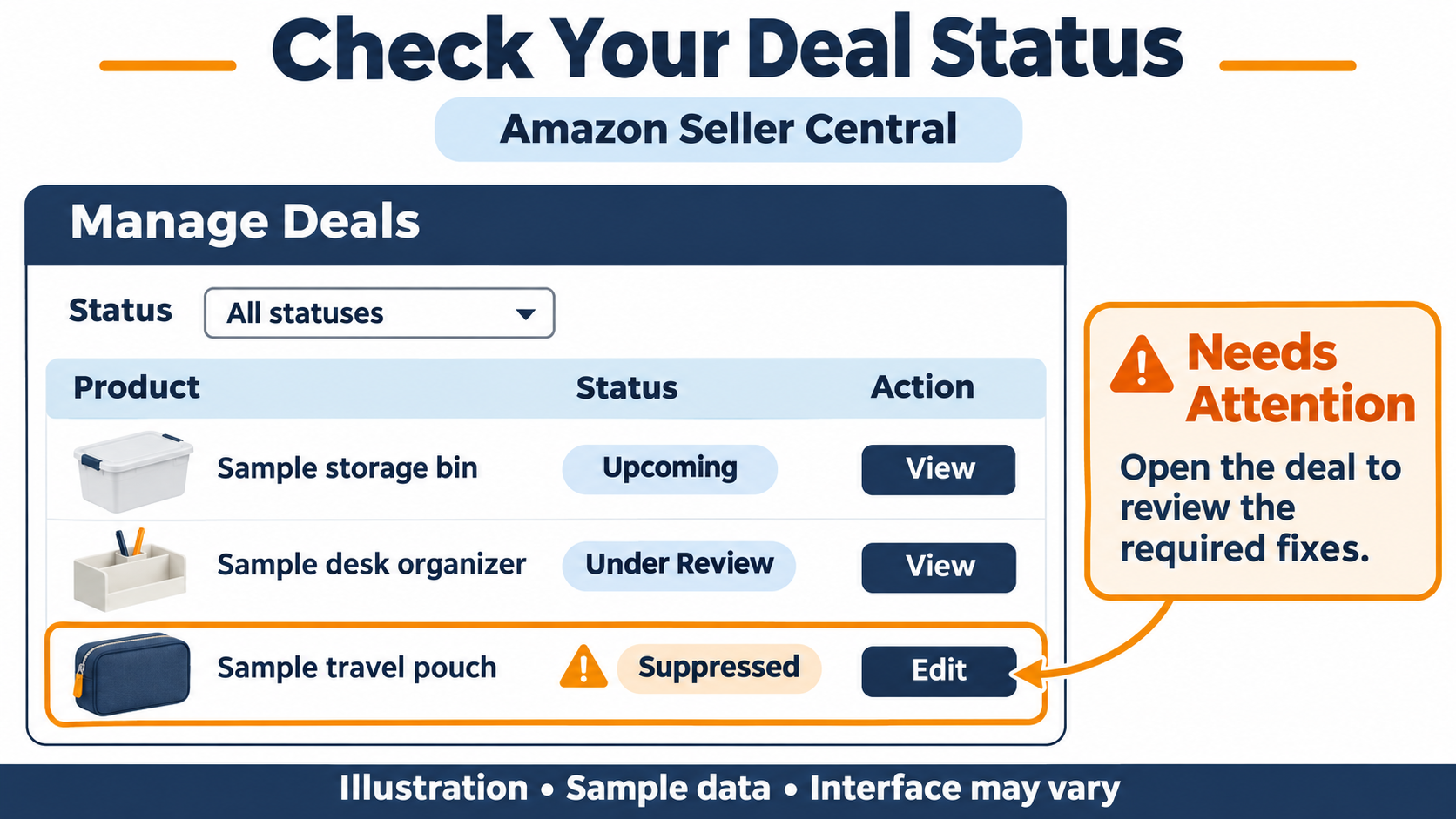
A deal you submitted isn't the same as a deal that will run. Open Seller Central today and check every deal, coupon and Prime Exclusive Discount for the November 19–30 window.
- Status: it should show as upcoming or running, not “needs attention” or canceled.
- Dates: they should match the event, not a test window you set earlier.
- Price: your current price should still be at or below the deal price Amazon requires.
- Stock: you need enough sellable units for the deal to stay live.
- Coupon budget: it should last the full event, since a coupon turns off once its budget runs out.
Know the cost before you add anything new. Since June 2, 2025, Amazon has charged $5 per coupon plus 2.5% of coupon sales. For Black Friday Week 2026, deals cost $100 upfront plus 1.5% of promotional sales, capped at $5,000, as reported by PPC Land.
If you missed the deal deadline, a coupon or a Prime Exclusive Discount is your fallback. In 2025, sellers could still set up Prime Exclusive Discounts after the event started, Modern Retail reported. Check the current cut-off and fee in Seller Central before you count on it.
2. Set a profit floor for every discounted product
Your profit floor is the lowest price at which a sale still breaks even after every cost. During Black Friday Week, that floor is higher than usual, because fees go up at the same time prices go down.
Amazon's holiday peak fulfillment fees run from October 15, 2026, to January 14, 2027. They average $0.32 more per unit than off-peak rates, and a 3.5% fuel and logistics surcharge applies on top, according to Retail Dive's report on Amazon's announcement.
Use this formula for each product you discount:
Profit floor = (product cost + FBA fee + ad cost per unit) ÷ (1 − referral fee % − promotion fee %)
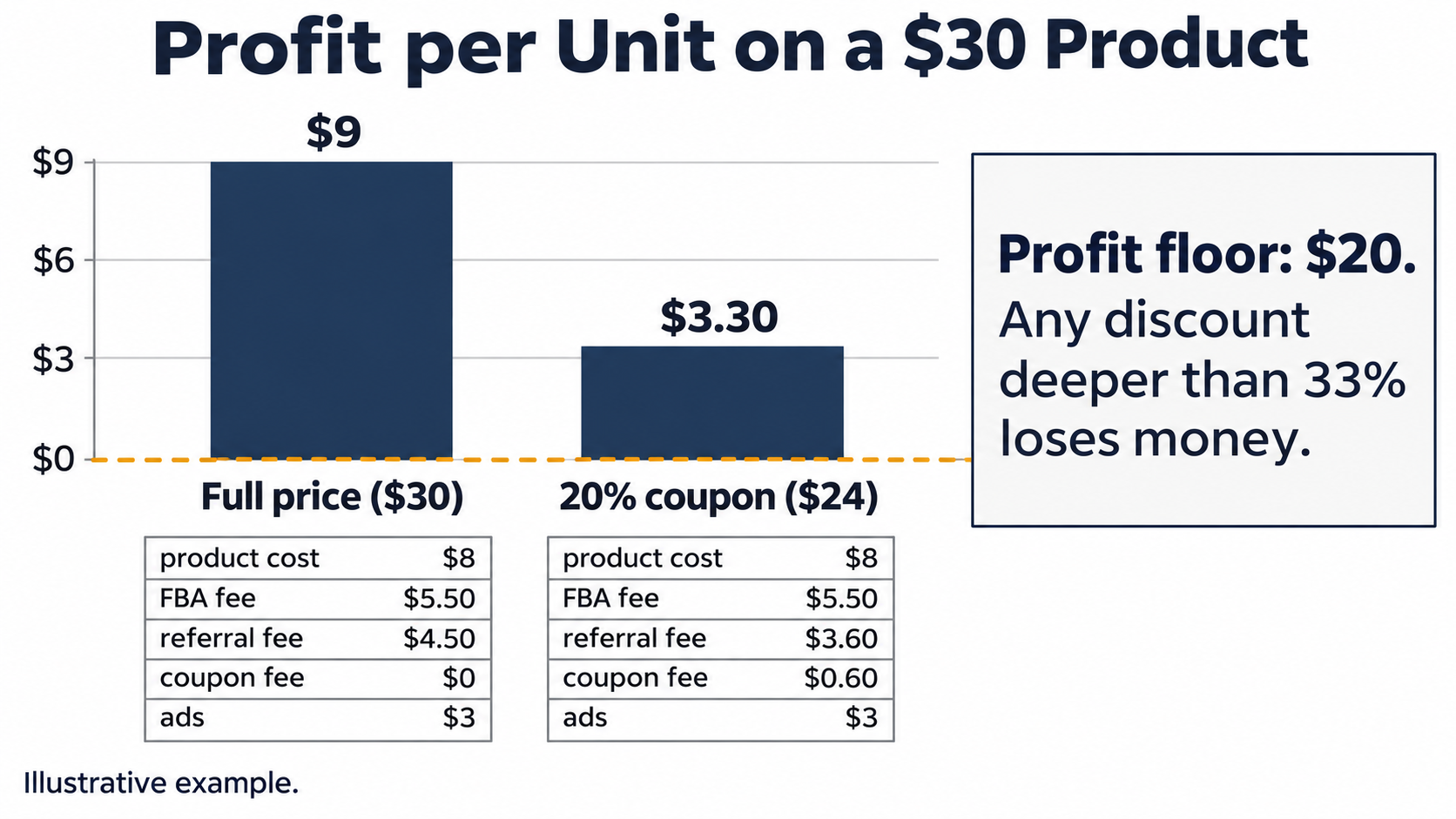
Here's a worked example. Say you sell a $30 product and run a 20% coupon during the event. These numbers are illustrative, so swap in your own costs and use your peak FBA fee:
| Line | Full price | 20% off |
|---|---|---|
| Selling price | $30 | $24 |
| Product cost (landed) | −$8 | −$8 |
| FBA fee, peak rate | −$5.50 | −$5.50 |
| Referral fee (15%) | −$4.50 | −$3.60 |
| Coupon fee (2.5% of sales) | $0 | −$0.60 |
| Ad cost per unit | −$3 | −$3 |
| Profit per unit | $9 | $3.30 |
- At 20% off, each sale earns $3.30 instead of $9.
- To make the same total profit, you'd need to sell about 2.7 times as many units ($9 ÷ $3.30), or 173% more.
- The profit floor is ($8 + $5.50 + $3) ÷ (1 − 0.15 − 0.025) = $16.50 ÷ 0.825 = $20. Any discount deeper than 33% loses money on every sale.
If your ad cost per unit rises during the event, as it often does, your floor rises too. We recommend running this math for your top 10 products before November 19. If a deal is already live below your floor, cutting the coupon depth or the ad spend on that product usually beats losing money on every order.
3. Make sure your strikethrough price will show
Amazon only shows a crossed-out “was” price if it can verify it. Amazon says it validates every deal against a verified strikethrough price, either a suggested retail price or what customers recently paid on Amazon.
Amazon tightened these reference-price rules in 2 stages this spring, on April 23 and May 18, 2026. If your list price can't be verified, or your product has been on promotion too often, your deal may show a smaller discount or no strikethrough at all.
- Check each event listing. Open it on desktop and mobile and look for the strikethrough price.
- Rely on the badge if there's no strikethrough. A coupon or deal badge still shows the saving.
- Don't raise your price to make the discount look bigger. The reference price looks back over weeks of sales, so a last-minute increase won't create a strikethrough. It can also break Amazon's Fair Pricing Policy.
Related Reading: Amazon's 2026 reference-price rules
4. Know your days of cover, then plan for stockouts
The FBA stock you have now is the stock you have for Black Friday. With inbound cutoffs closed, new shipments may not be received in time. Your job now is to make what you have last, or to have a backup.
Days of cover = units Amazon has received and can sell ÷ expected daily sales during the event
Count only sellable units at Amazon, not units in transit, in receiving or at your warehouse. If a product normally sells 30 units a day and you expect 3 times that during the event, 900 sellable units last about 10 days. That isn't enough for a 12-day event.
If a best seller will run out early, you have 4 options:
- Add a backup Fulfilled by Merchant (FBM) offer. If you hold stock at your own warehouse or a third-party logistics provider (3PL), list it on the same Amazon Standard Identification Number (ASIN) so the listing stays buyable when FBA stock runs out.
- Cut ad spend on low-stock products. Paying for clicks you can't fill wastes budget and brings the stockout sooner.
- Skip deeper discounts on that product. Don't speed up sales of something you can't restock.
- Check AWD replenishment. If you use AWD, confirm automatic replenishment to FBA is on and moving stock.
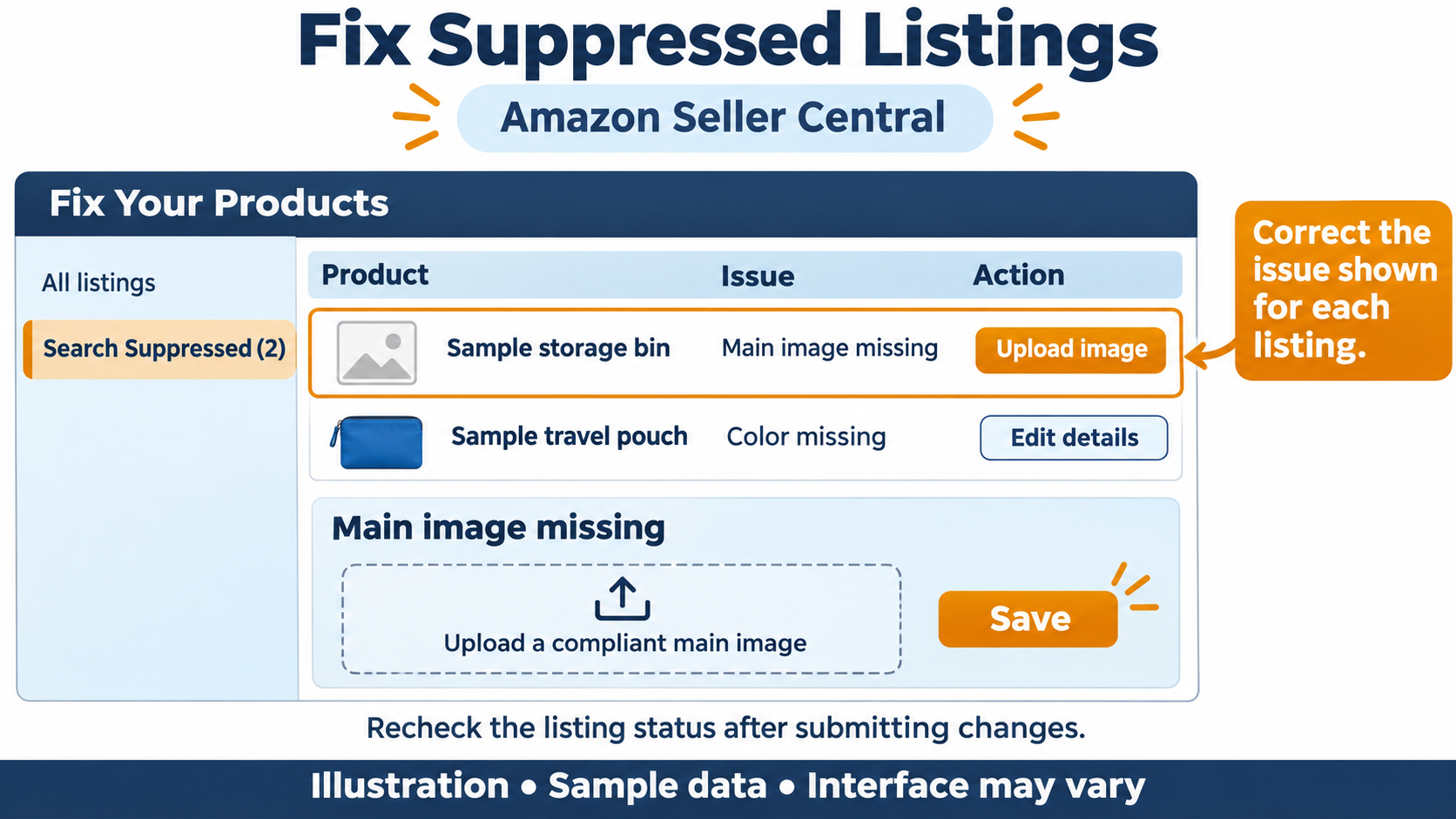
5. Fix suppressed listings, then stop editing
The safest listing change this week is fixing what's broken. Check Seller Central for suppressed or inactive listings, missing attributes and lost Buy Box ownership on your event products, and fix those today.
After that, leave your titles, keywords, bullet points and variation families alone until December. A large change can send a listing back through review or knock it out of search results at the worst possible time.
If you want a holiday touch, lower-risk changes include a giftable lifestyle image in slots 2–7 (never the main image) and a gift guide in your Amazon Store. A+ Content and Store changes go through Amazon review, so anything you submit now may not be live in time.
6. Check how your listing looks on a phone
Most Black Friday shoppers will see your product on a phone first. Adobe expects a record 63% of Cyber Week online spending to come through mobile devices, according to Chain Store Age's report on Adobe's 2026 forecast.
Open your top listings in the Amazon app and check 3 things:
- Your main image is clear and recognizable at thumbnail size in search results.
- Your coupon or deal badge actually shows.
- The first screen of the listing explains what the product is without scrolling.
If you also run your own store, place a real test order on your phone with a discount code. Check the code applies, shipping costs are right and every payment option works, including buy now, pay later. Do it again after any theme or app change.
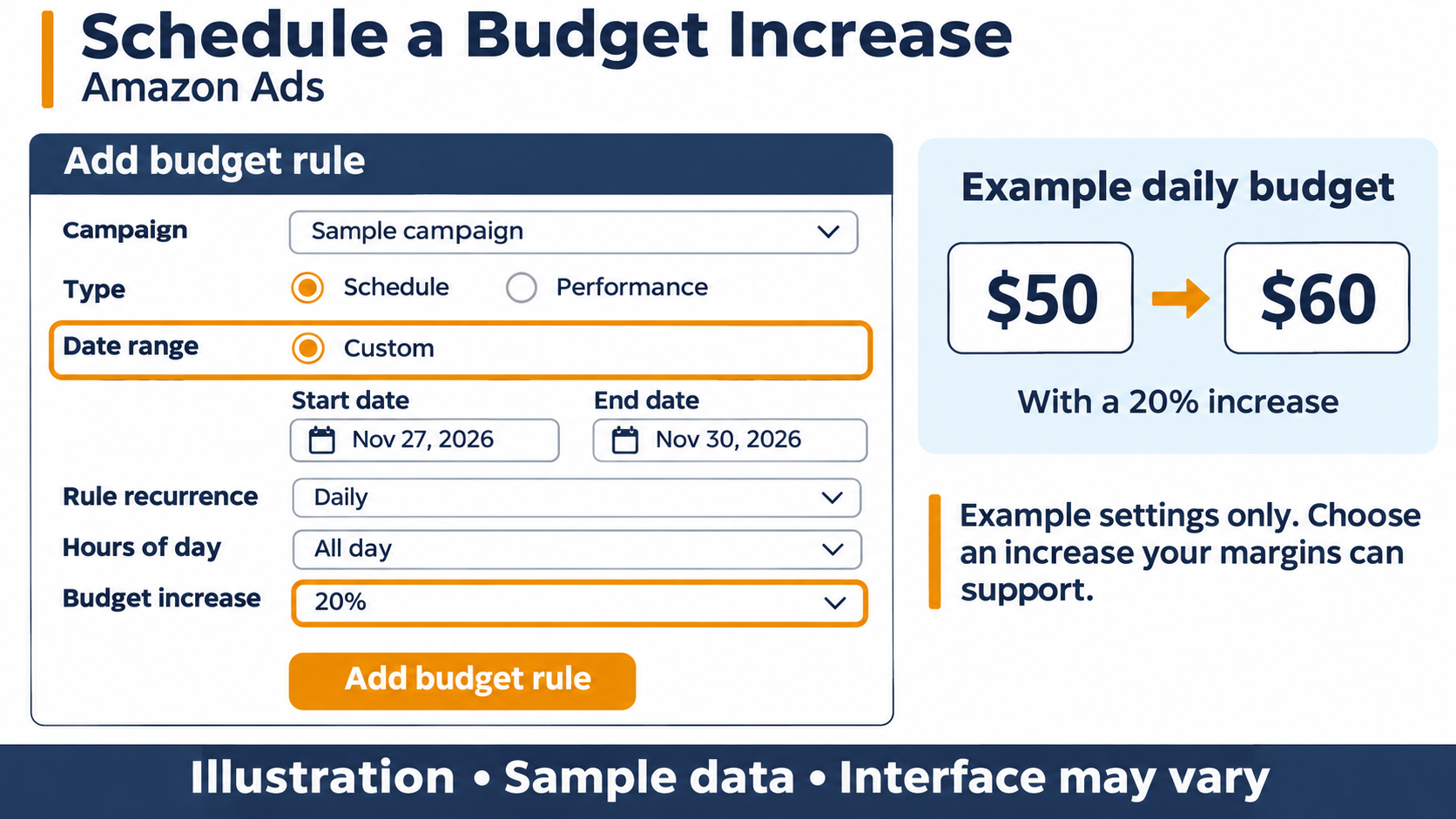
7. Set ad budgets by phase
Ads that run out of budget by midday miss the evening shoppers. Clicks get more expensive and more frequent during the event, so last month's daily budgets usually aren't enough.
| Phase | Dates | What to do |
|---|---|---|
| Lead-in | November 19–26 | Raise budgets on your best-converting campaigns. Keep bids steady and watch which products are moving. |
| Peak | November 27–30 | Set higher budgets for Black Friday and Cyber Monday. Protect your branded keywords so competitors can't take those shoppers cheaply. |
| After the event | December 1 onward | Lower budgets gradually, not all at once. Holiday shopping continues into December. |
In Amazon Ads, schedule-based budget rules raise budgets for set dates, so you don't have to change them by hand at midnight. Set them up now and test one before the event starts.
Judge results by Total Advertising Cost of Sale (TACoS), not only Advertising Cost of Sale (ACoS). ACoS often rises during deal events because prices fall, while TACoS shows whether ads still pay off across all your sales.
From our experience
[EDITOR: Add a dated, first-hand result from one of our brands. For example, how much we raised daily budgets for Black Friday 2025, what happened to ACoS and TACoS, and whether the extra spend paid off.]
Related Reading: Amazon pay-per-click (PPC) guide
8. Publish shipping cutoffs you can keep
A late gift costs you more than the sale. It brings refunds, bad reviews and A-to-z claims, and those come back in January.
If you ship orders yourself, through FBM or your own store:
- Check your shipping settings. Review holiday shipping settings and handling times in Seller Central, and set delivery promises you can meet.
- Prepare for volume. Stock up on packaging and line up extra help for the days after Black Friday.
- Get last-ship dates from each carrier. Use each carrier's own holiday page. Christmas falls on a Friday this year, December 25, 2026.
- Show a last-order date. Add a “last day to order for Christmas delivery” banner to your store, set 1–2 days before the carrier deadline.
Budget for carrier surcharges too. Peak surcharges began with UPS on September 27, 2026, according to ShippyPro's 2026 surcharge tracker. Add them to the profit floor from fix 2 for anything you ship yourself.
9. Prepare customer service and returns
More orders mean more questions, and holiday returns keep coming until January 31. Amazon says items bought between November 1 and December 31, 2026, can be returned until January 31, 2027, except Apple products, which have a January 15 deadline. The window applies to both FBA and FBM orders, according to Amazon's Seller News post, as reported by PPC Land. Amazon also says the policy will now apply every year.
- Write reply templates for the questions you'll get most: delivery dates, gift receipts, coupon problems and returns.
- Decide who answers buyer messages each day through Thanksgiving weekend. Amazon expects replies within 24 hours, weekends included.
- Set aside cash for January refunds. A strong Black Friday can mean a weak-looking January payout.
- If you run your own store, turn on your payment processor's fraud screening and check unusually large or rushed orders before you ship them.
10. Run a 10-minute check every morning
Most Black Friday problems are cheap to fix if you catch them the same morning. A canceled deal, a suppressed listing or an empty ad budget can each cost a full day of sales if no one notices.
Each morning from November 19 to November 30, check:
- Deal and coupon status for your event products
- Sellable stock and days of cover
- Buy Box ownership and any suppressed listings
- Ad spend against budget, and campaigns that ran out the day before
- Account Health alerts and new negative feedback
Write down who owns each check and who covers when that person is off. Amazon's own peak preparation checklist also tells sellers to plan shifts and time off in advance, which is easy to skip and matters over a 12-day event.
FAQ
Is it too late to submit an Amazon Black Friday deal?
For Best Deals and Lightning Deals, yes. The original deadline was October 20, 2026, and the reported extension ended November 13. You can still add coupons, and you may still be able to add Prime Exclusive Discounts, so check Seller Central.
Can I still send inventory to FBA before Black Friday?
You can send it, but it may not arrive in time. Amazon's arrival deadlines for Black Friday Week were October 21 and October 28, and receiving slows during peak season. A backup FBM offer is the more reliable way to stay in stock this week.
Should I raise prices before Black Friday so my discount looks bigger?
No. Amazon bases its strikethrough price on verified prices from weeks of past sales, so a last-minute increase won't create a bigger “was” price. It can also break Amazon's Fair Pricing Policy and cost you the Buy Box.
How long do holiday returns last on Amazon in 2026?
Items bought between November 1 and December 31, 2026, can be returned until January 31, 2027. Apple products have a January 15 deadline. The window applies to both FBA and FBM orders.
Bottom line
With Amazon's event starting November 19, don't try to change everything. Make sure the deals you have are live and profitable, and that your best sellers won't run out halfway through the event. Your next step is to run the profit-floor math in fix 2 on your top 10 products today.